Scan a cadet ID.
Let’s check your phone’s camera with the CAPID barcode on an existing ID.
Your camera preview appears hereKeep the whole barcode in view
Camera off
Ready when you are. Tap Start camera and allow camera access.
Hold your phone upright and place the barcode horizontally across the wide frame. Keep the entire barcode visible in good light; move the ID closer or farther to focus.
CAPID result
WaitingA successful scan will appear here. Scanning stops after a valid CAPID.
- Read using
- —
- Barcode format
- —
Scanner details
- Raw barcode text
- Nothing read yet
- Last read
- —
- Camera support
- Checking…
Another way to test
Use a barcode photo, or enter a CAPID to check the screen without a camera.
Need a sample barcode?
Display this on another screen or print it, then scan it with your phone.
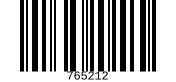
Test value: 765212 · Code 128